
Skip to content

Serious portfolio maths, explained like you're new to it.

Track shares, ETFs, funds (French OPCVM included) and crypto in one place, with weighted-average cost (PMP) and two returns: TWR, which judges your investments, and XIRR, which also counts when you invested.

  • Shares
  • ETFs
  • Funds
  • Crypto
  • Cash
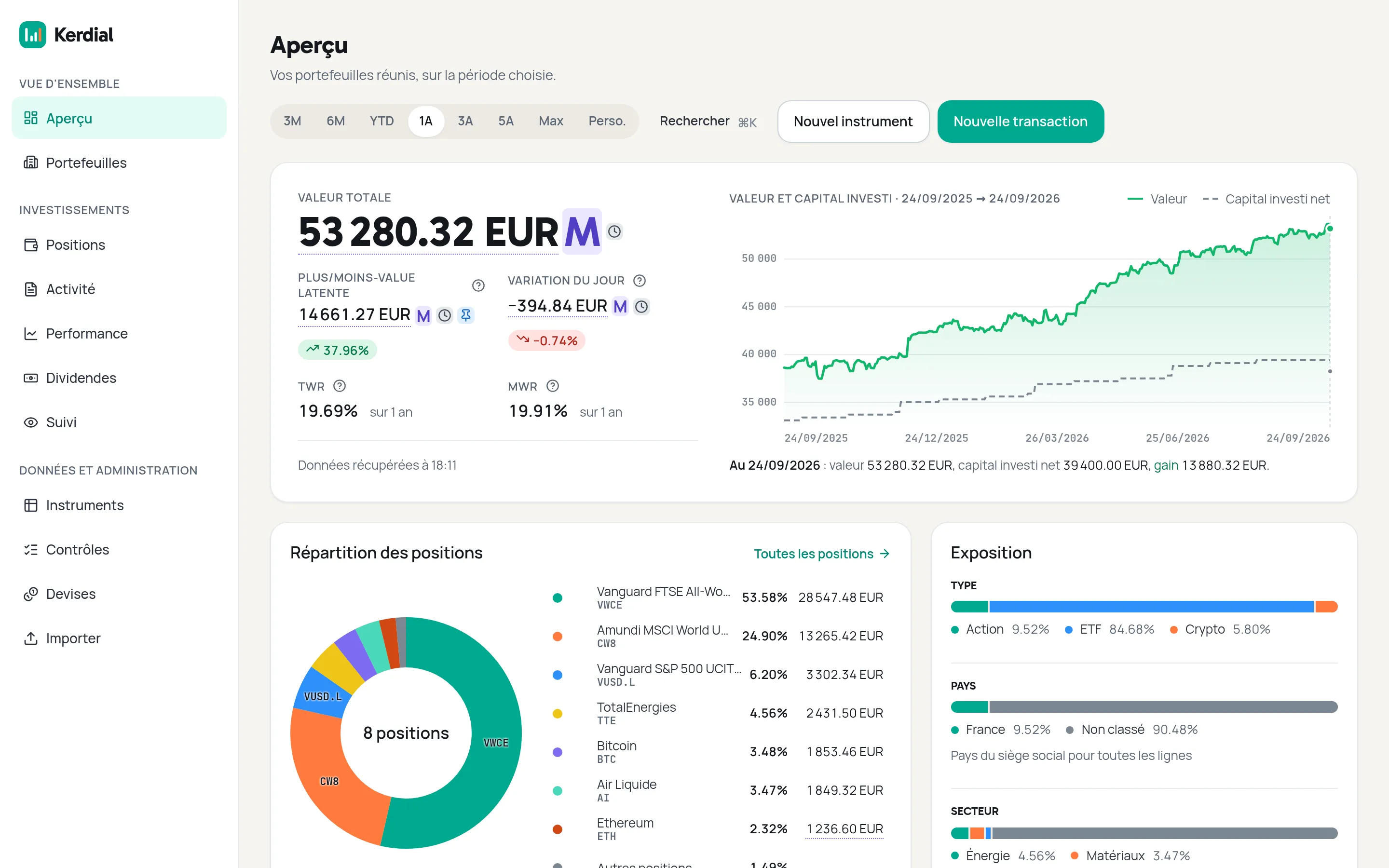
Kerdial overview: total portfolio value, unrealised gain, TWR and MWR over one year, a chart of value against invested capital, and holdings by weight.
Demo portfolio
What you get

Serious tracking, beginner-friendly on purpose.

  • Exact maths

    Every amount is computed in exact decimal arithmetic, never floating point. Your cost basis is computed as a weighted average (PMP).

  • Two returns, side by side

    TWR judges your investments; XIRR also counts when you invested. Kerdial shows both for the period you pick.

  • Multi-currency, pinned FX

    Hold assets in euros, dollars or other currencies. Each transaction keeps the exchange rate you pinned, so past figures don't drift.

  • Your data stays at home

    Kerdial runs on your own PC or NAS, so your data stays on your machine. One installation serves your whole household, each person with their own login.

The method

Two returns. One answer to “how am I doing?”

The two figures answer different questions. Kerdial shows them together, each with its definition.

Time-weighted return (TWR)
Time-weighted return measures how your investments performed, whatever you added or withdrew along the way.
Money-weighted return (MWR, XIRR)
Money-weighted return counts when you invested, not only how much.
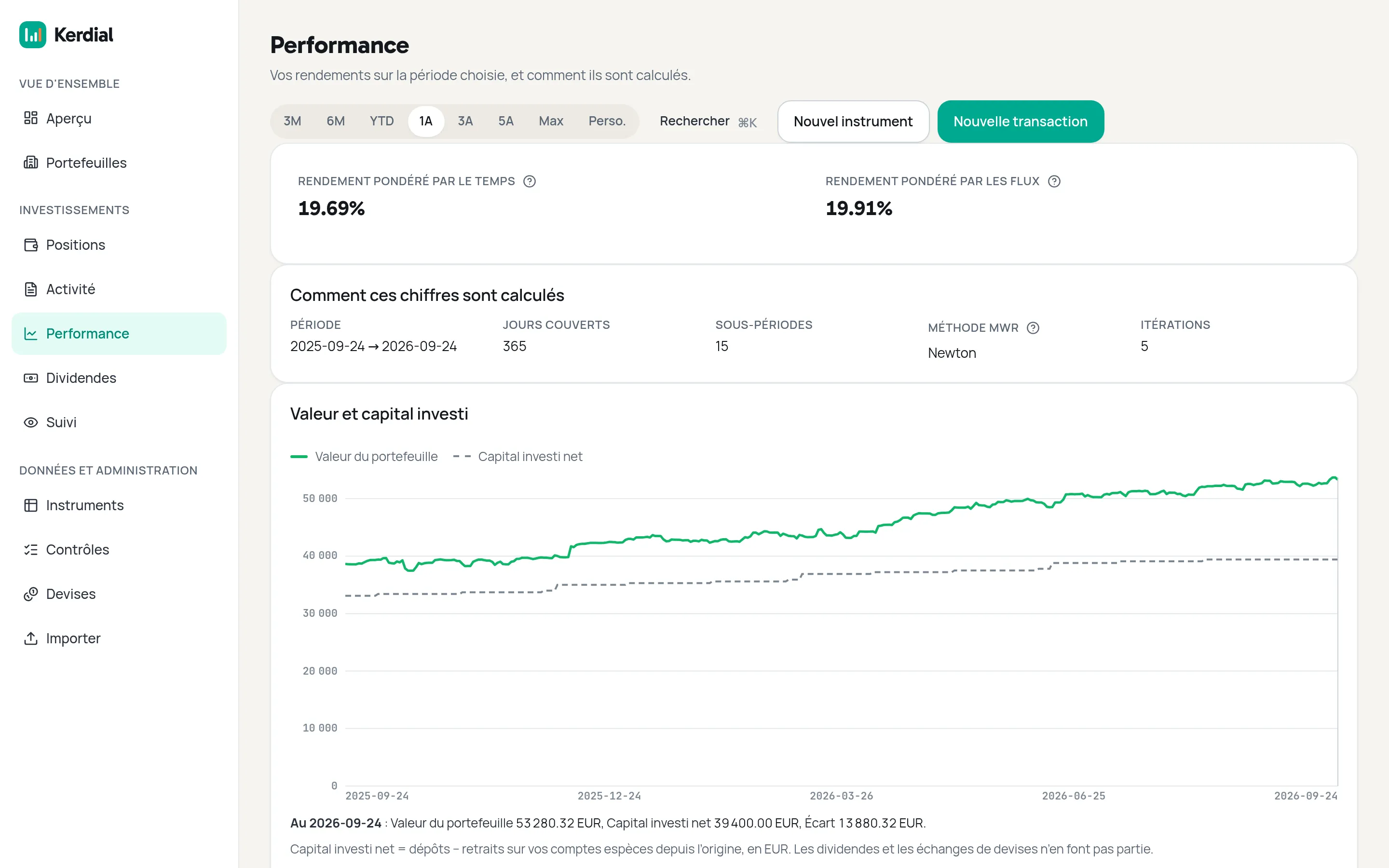
Kerdial performance screen: time-weighted and money-weighted returns over one year, how they were calculated, and a chart of portfolio value against net invested capital.
Performance: both returns and how they are calculated · Demo portfolio
Features

What Kerdial does for you.

Every feature described here exists in the app today. The screens are real, on a demo portfolio, and the app's interface is in French for now.

  • All eight transaction kinds, crypto-settled trades included

    Every movement in your portfolio has its own kind. A crypto purchase can be paid for with another crypto you hold, with no made-up sale to euros in between.

    • Buy
    • Sell
    • Deposit
    • Withdrawal
    • Dividend
    • DRIP
    • Currency exchange
    • Bonus shares
  • CSV import in Portfolio Performance format

    Bring in your Portfolio Performance exports. A dry run shows, row by row, what will be imported, skipped or rejected, before anything is written.

  • Several portfolios

    Create one portfolio per account, for example your PEA, your securities account and your crypto. Kerdial values each one, then all of them together, over the period you choose.

  • Multi-currency, at your broker's rate

    Kerdial keeps the original amount and converts it to euros; if you enter the rate your broker applied, that rate counts, never a market rate. Your cash is tracked currency by currency.

  • Cost basis and gains

    Each holding's cost basis is computed as a weighted average (PMP), along with your unrealised and realised gains. These figures are a reference for you; they do not replace your tax return.

  • Three returns

    TWR and XIRR side by side, computed from the exact dates and amounts of your transactions, plus each holding's simple return, which compares today's value with what you paid.

  • Prices with known provenance

    Shares and ETFs from Yahoo (about 15 minutes delayed), crypto from CoinGecko, exchange rates from the ECB; for a fund no source covers, you enter the price yourself. Every price shows its date and provenance.

  • Dividends

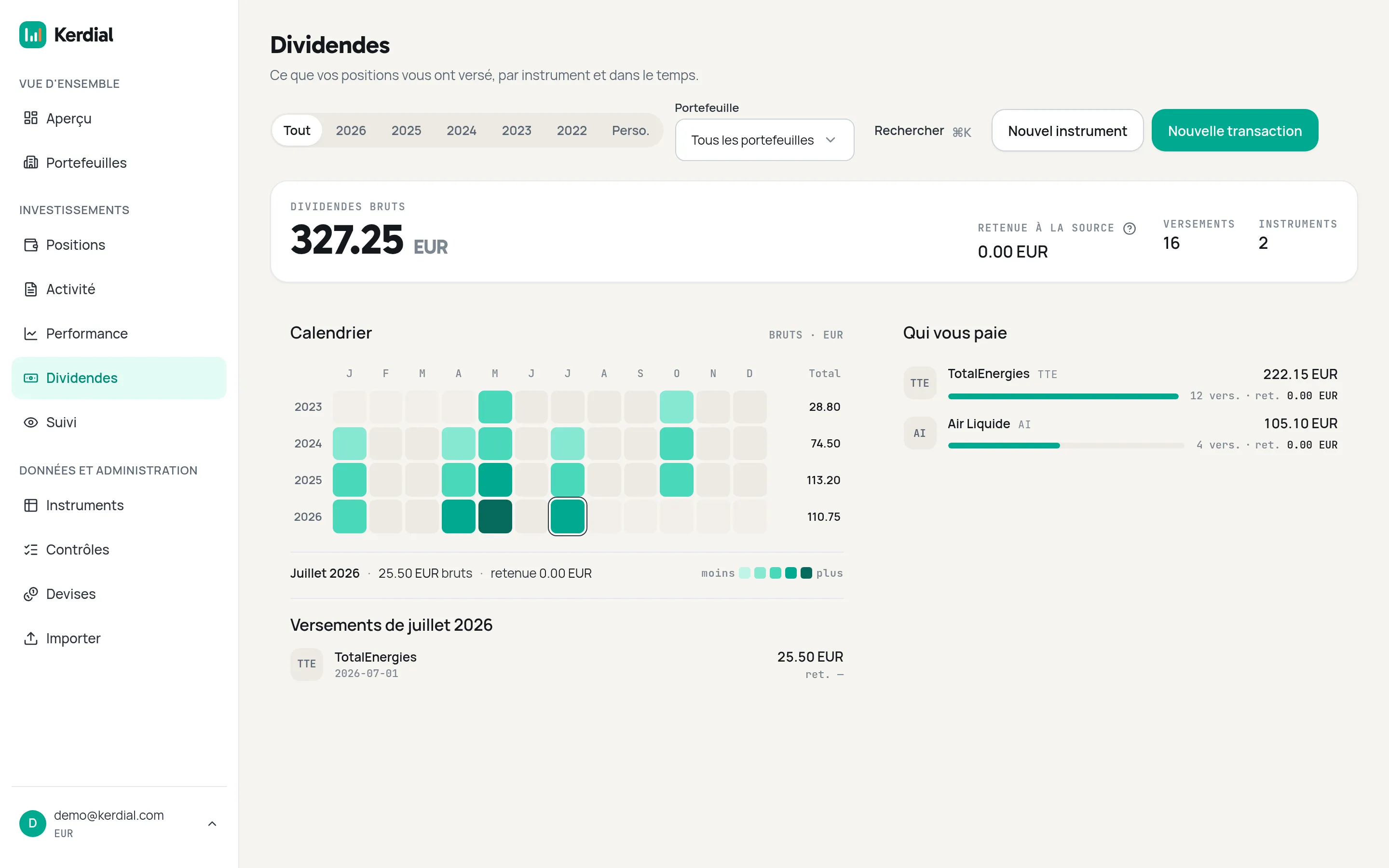
    For each instrument, the gross dividends received and the withholding tax, shown separately, and a month-by-year calendar that shows when you get paid.

  • Watchlist

    Last price, change, distance from the one-year high, volatility and moving averages for the securities you keep an eye on. A target price is a number to read: Kerdial sends no alert.

  • On your phone too

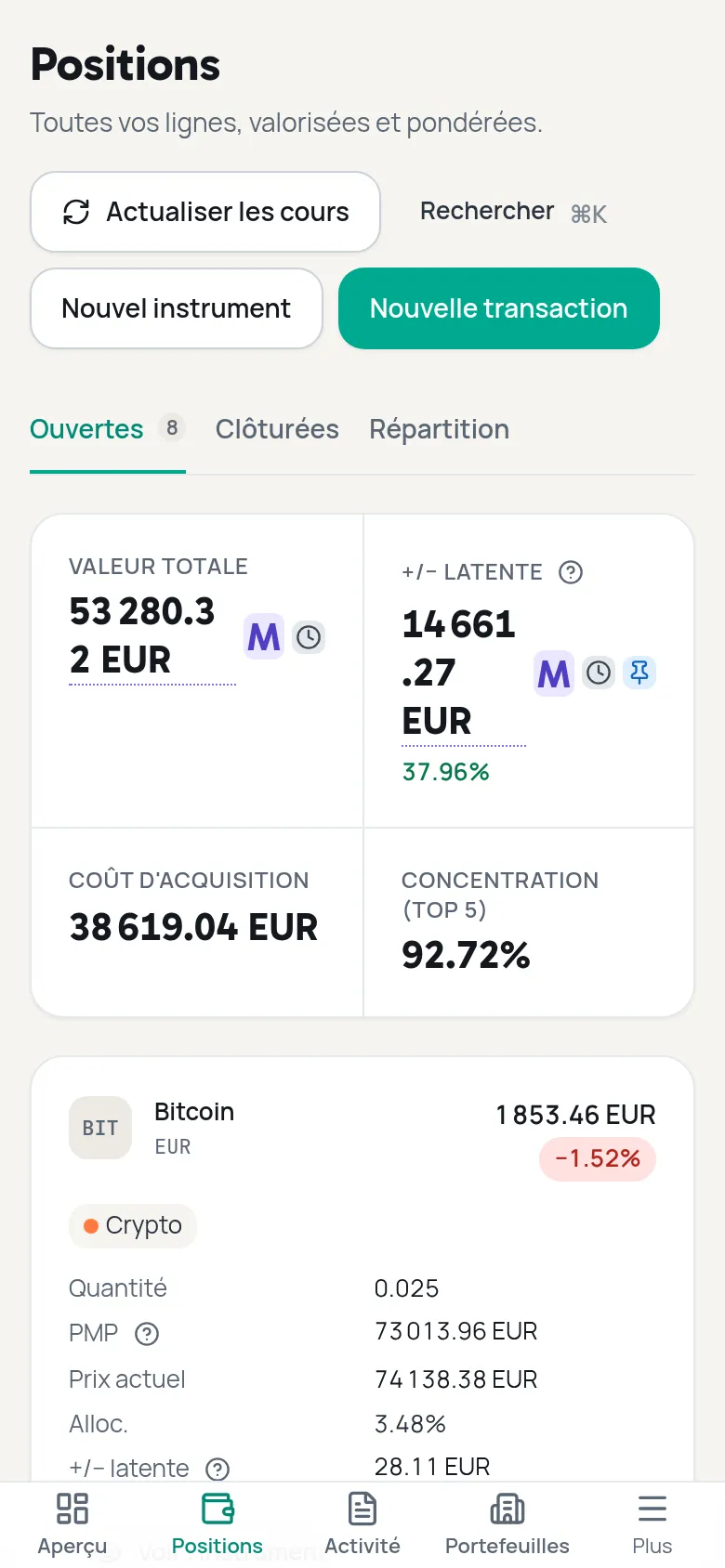
    Kerdial installs on your phone's home screen like an app (PWA). You can check your overview, holdings and history there, and record transactions.

  • The whole household, one installation

    The first account created becomes the administrator and creates a personal login for each household member. The whole household shares the same installation and the same data, with no self-service registration.

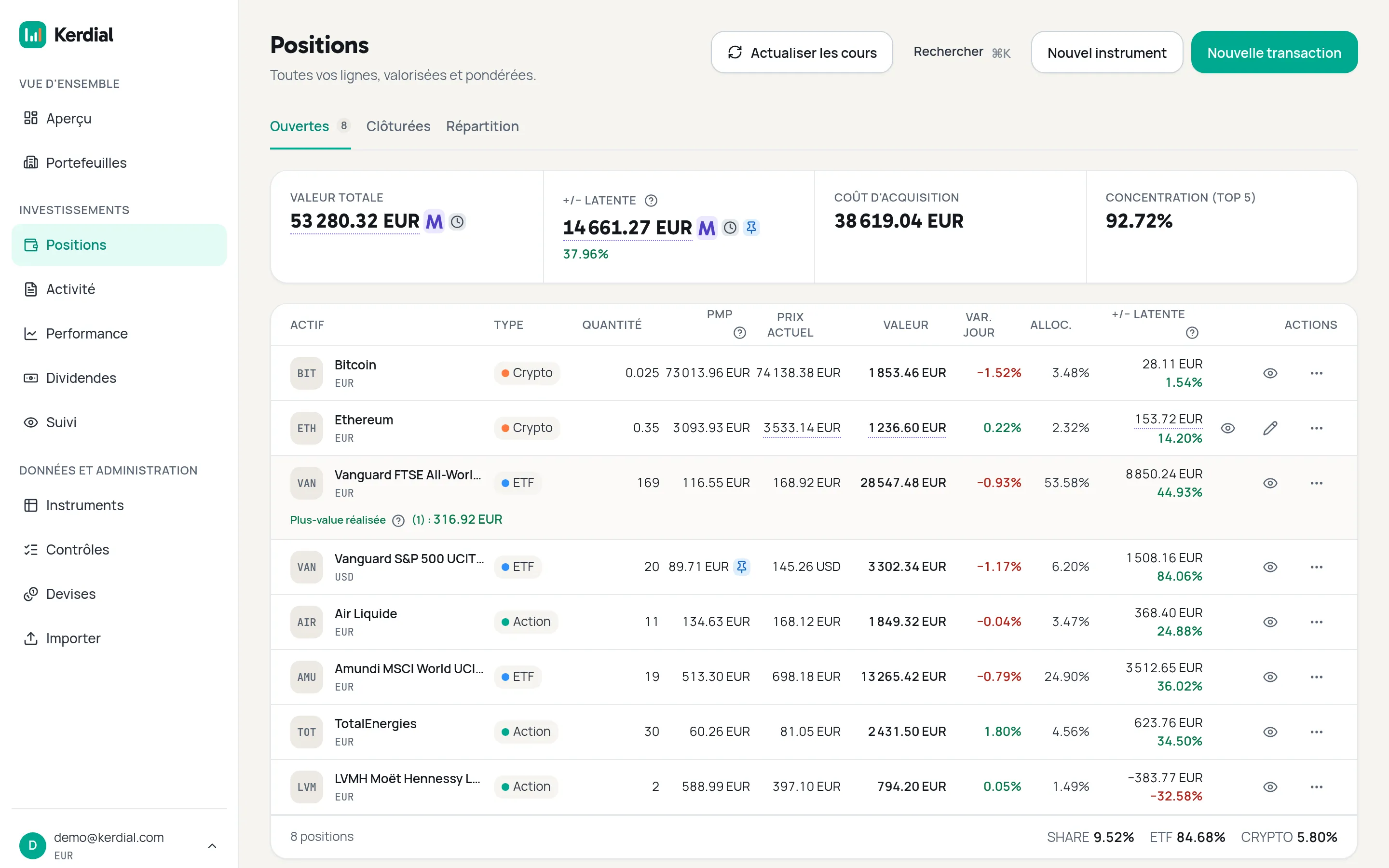
Holdings table: shares, ETFs and crypto with quantity, weighted-average cost, current price, value, allocation and unrealised gain.
Holdings: PMP, unrealised and realised gains
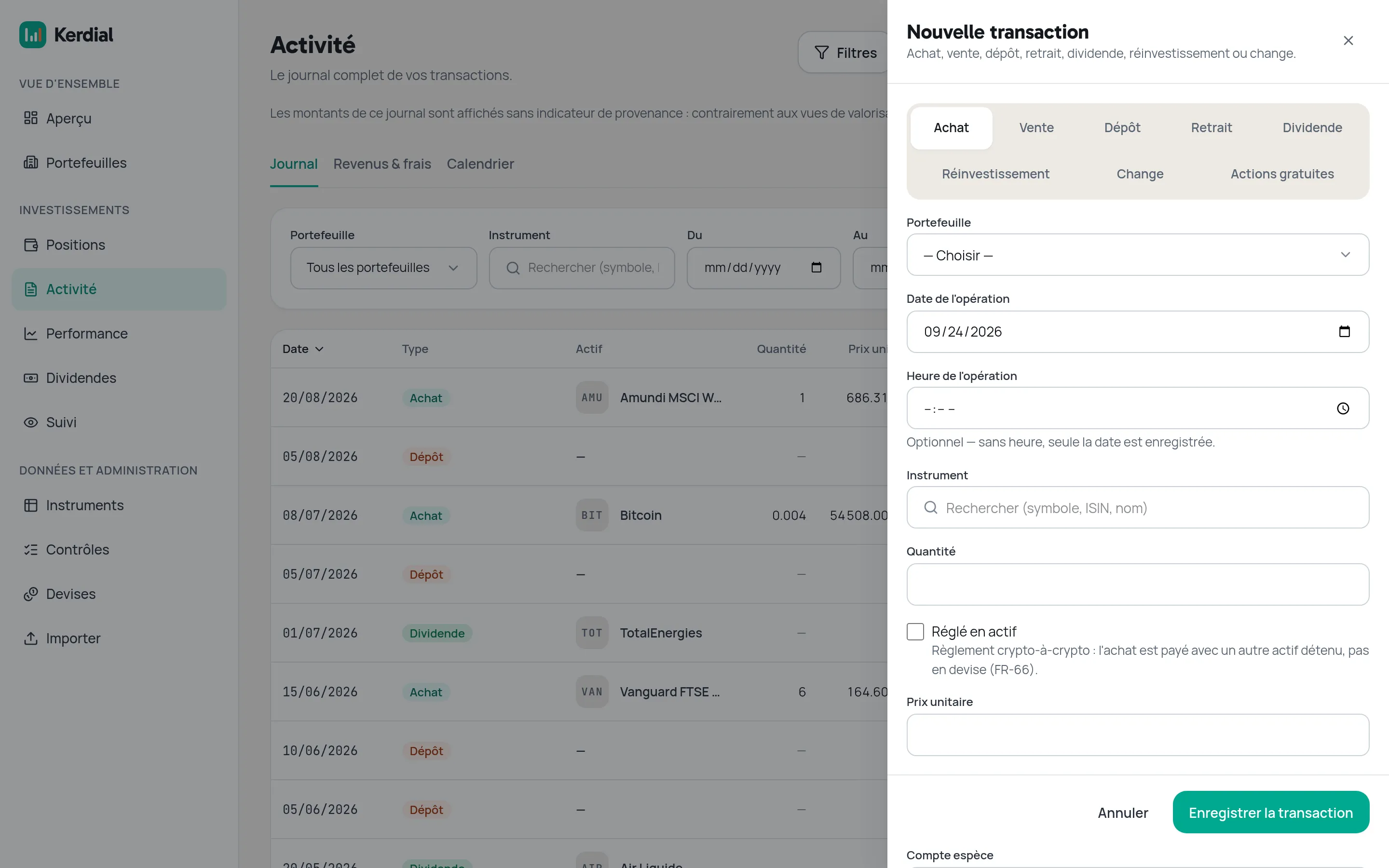
The New transaction form open over the Activity screen: tabs for buy, sell, deposit, withdrawal, dividend, reinvestment, currency exchange and bonus shares, then portfolio, date, instrument, quantity and a “settled in an asset” checkbox.
New transaction: one tab per transaction kind
The Dividends screen: gross dividends total, withholding tax, number of payments and instruments, a month-by-year calendar and a ranking of the instruments that pay you.
Dividends: calendar and who pays you
The Holdings screen on a phone: total value, unrealised gain, acquisition cost and concentration, then one card per holding with quantity, PMP, current price and allocation.
Mobile: your holdings on a phone
Limits

What Kerdial is not.

Kerdial tracks your investments, at home. Here is what it does not do, so you know what to expect before you install it.

  • No sync with your bank or broker Kerdial never has access to your accounts: you enter your transactions, or import them.
  • Not a tax-filing tool It computes your PMP and realised gains for your own information, and does not fill in or submit any tax return.
  • No PEA or CTO tax rules Neither the PEA's holding-period exemption nor the tax differences between French account types are modelled.
  • No order placement Kerdial buys and sells nothing: your orders stay with your broker.
  • No advice or recommendations It never tells you what to buy, sell or keep.
  • No social feed or leaderboards No public profile, no sharing, no comparison with other investors.
  • Shares, ETFs, funds and crypto, nothing else Plus your cash. Bonds, real estate, private equity, options and futures are not tracked.
  • No real-time quotes Share, ETF and fund prices are about 15 minutes delayed; only crypto is refreshed close to real-time.
  • No alerts or notifications Kerdial shows your data when you open it and sends you nothing.
  • A French-only interface The app is only in French for now; this site is in English too.
  • Not a hosted service No account to create with us and no subscription: you install Kerdial on your PC or NAS, and you run it.
Install

Free, open source, and yours to run.

Kerdial is published under the AGPL-3.0 licence. It runs with Docker on your PC or Synology NAS, and starts with three commands.

  1. Check what you need

    • Docker and Docker Compose. Nothing else: the app ships as one image.
    • A PC or a Synology NAS with an x86-64 processor (Intel or AMD): the image is published for that architecture only.
    • The repository's deploy folder, with the docker-compose.yml file and the .env.example template.
  2. Start Kerdial

    In the deploy folder, copy the configuration template, fill it in, then start the stack:

    cd deploy
    cp .env.example .env && $EDITOR .env
    docker compose up -d --wait

    The .env file holds your passwords and the app's port; its comments explain every setting.

  3. Create the administrator account

    Open Kerdial in your browser: a setup screen creates the first account, which becomes the administrator. It asks for a one-time token, which the app writes to its logs on every start until that account exists:

    docker compose logs api | grep 'setup token' | tail -1

    Only the most recent token printed is valid. Create this account before you make Kerdial reachable from your network, as the deploy guide explains.

  4. A reverse proxy, if you want one

    Kerdial listens on a plain HTTP port. For a domain name and HTTPS, put your own reverse proxy in front (nginx, Caddy, Traefik…): it is optional, and it is yours.

Where to invest

Where to keep your investments?

Kerdial tracks any account, at any broker. Here are the three most common French wrappers, and one partner offer for each. It is not advice: what fits depends on your situation.

PEA

The share savings plan (PEA)

The PEA is an account for investing in shares of European companies and in eligible funds or ETFs. You can pay in up to €150,000. After 5 years, the gains you withdraw are free of income tax but still subject to social contributions; before 5 years, a withdrawal normally closes the plan.

Official source: Plan d'épargne en actions (PEA), service-public.gouv.fr (in French)

Securities account

The ordinary securities account (CTO)

The ordinary securities account takes almost anything: shares and ETFs from around the world, with no limit on what you pay in. It has no tax advantage: dividends and capital gains are taxed in the year you receive them, by default at the flat tax (12.8% income tax, plus social contributions), or at the progressive income-tax scale if you choose it.

Official source: Revenus d'épargne et de placement, service-public.gouv.fr (in French)

Assurance-vie

Assurance-vie (French life insurance)

Assurance-vie is a contract with an insurer that can hold a euro fund managed by the insurer and unit-linked funds (funds, ETFs) whose value moves. After 8 years, the gains you withdraw get a yearly allowance of €4,600 (€9,200 for a couple). On death, amounts from premiums paid before age 70 are exempt up to €152,500 per beneficiary.

Official sources: Imposition des revenus d'une assurance-vie, service-public.gouv.fr (in French) · Bénéficiaire d'une assurance-vie, impots.gouv.fr (in French)

PEA

Fortuneo

Fortuneo PEA, with a sponsor code

What you get

  • If you open or transfer your first PEA at Fortuneo and enter this sponsor code, Fortuneo says you receive a €80 bonus.
  • No custody fees and no account-keeping fees on the brokerage account, according to Fortuneo's price list of 6 August 2026.
  • On the Starter plan, the first order of the month up to €500 carries no brokerage fee; other orders cost 0.35% (Euronext Paris, Brussels, Amsterdam).
  • Separately, the Gold CB Mastercard bank card is free if you make at least one card payment each month, otherwise €9 a month. Fortuneo also runs a separate sponsorship bonus for opening a bank account with a card; its amount and dates change, see Fortuneo's sponsorship page.

Conditions

  • Initial deposit of €1,000 on opening; this does not apply to a PEA transfer.
  • The bonus requires also opening a Fortuneo deposit account.
  • Open to adults who are French tax residents and have never held a Fortuneo account or contract.
  • You enter the code in the account-opening form; the bonus is paid within the time set by the offer's legal notes, which the public page does not detail: read them before opening.
  • Gold card for a new customer: €2,200 net monthly income to be proven (individual account).
  • Investing in shares carries a risk of capital loss.

Who it suits: May suit you if you plan to invest in European shares and ETFs over several years, with infrequent orders.

Sponsor code 13623839

Go to Fortuneo

Affiliate link — Kerdial may receive a commission, at no extra cost to you.

Terms checked on · Official terms

Securities account

Saxo

Saxo securities account, with a referral link

What you get

  • If you open your first Saxo securities account through this link and fund it, Saxo refunds up to €500 of brokerage fees for 90 days.
  • No account-keeping, inactivity or custody fees, and no minimum deposit, according to Saxo's price list applicable since 5 May 2026.
  • Shares on Euronext: 0.08% per order, minimum €2 (Classic plan). Main US exchanges: 0.08%, minimum USD 1, plus 0.25% currency conversion.

Conditions

  • First opening of an individual or joint securities account, through this referral link.
  • The account must be funded within 30 days of its creation.
  • The €500 is not paid in cash: it is a credit that refunds eligible brokerage fees, valid for 90 days after activation.
  • Open to adults who are tax residents of an eligible country, subject to Saxo accepting the application. Saxo may change or end the offer at any time.
  • Investing carries a risk of capital loss.

Who it suits: May suit you if you want to buy shares or ETFs outside Europe, or invest with no limit on what you pay in.

Go to Saxo

Affiliate link — Kerdial may receive a commission, at no extra cost to you.

Terms checked on · Official terms

Assurance-vie

Linxea

Linxea assurance-vie, with a referral link

What you get

  • If you take out your first assurance-vie (or PER) contract with Linxea online, after entering your email on the referral page, Linxea says you receive a €50 voucher, as a gift card.
  • Linxea Spirit 2: 0% entry, payment and online switching fees (excluding SCPI, SCI, ETFs, FCPR and shares) and 0.5% a year management fee on unit-linked funds; from €500.
  • Linxea Avenir 2: 0% entry and payment fees (same exclusions) and 0.6% a year on unit-linked funds; from €100.

Conditions

  • New Linxea customer, aged 18 or over, contract taken out fully online.
  • Cannot be combined with a promotional code or offer.
  • The email you use for the contract must be the one entered on the referral page.
  • The voucher is emailed once the insurer has validated the contract and the 30-day withdrawal period has passed, so at least 5 weeks; it is then valid for 90 days.
  • Other fees may apply, detailed in each contract's terms. Unit-linked funds carry a risk of capital loss.

Who it suits: May suit you if you want a long-term wrapper that combines a euro fund with unit-linked funds, such as funds or ETFs.

Go to Linxea

Affiliate link — Kerdial may receive a commission, at no extra cost to you.

Terms checked on · Official terms

About these offers

These are affiliate links: if you open an account through them, Kerdial may receive a commission, at no extra cost to you. That is what funds this site. The conditions were taken from the partners' pages on the date shown on each offer; they can change, and the partner's official page prevails.

FAQ

Frequently asked questions.

Is Kerdial really free?

Yes. Kerdial is published under the AGPL-3.0 licence: you install and run it for free, with no subscription and no paid tier.

How is this site funded?

Through affiliate links to partner brokers (Fortuneo, Saxo, Linxea), always disclosed as such. Whether you click them or not, it changes nothing in the app: Kerdial stays free and open source.

Where is my data stored?

On your own machine. Kerdial runs at home, in a local database; your transactions and amounts never leave your PC or NAS.

Which brokers are supported?

Any of them. Kerdial never connects to a bank or a broker: you enter your transactions by hand, or import a CSV export in Portfolio Performance format.

Does Kerdial work on my phone?

Yes, as a PWA: open the site in your phone's browser and install it on the home screen, with no app store involved.

Is there an English version of the app itself?

Not yet: the app's own interface is French only for now. This website, though, exists in English too.

Do I need to be technical to install it?

You need basic Docker and command-line skills. The install guide walks through every step, and the deploy runbook covers more advanced cases.

Is this investment advice?

No. Kerdial shows and computes your figures; it never tells you what to buy, sell or keep. See the legal notice for details.

How do I report a bug?

Open an issue on GitHub, in the project's repository.

How are updates delivered?

As Docker images published on Docker Hub (docker.io/kerdial/kerdial), one per release; check the release notes before you update.